
#
How Phoeniqs Cloud Works
Phoeniqs Cloud organizes infrastructure through a hierarchy of concepts that map directly to what you see in the Phoeniqs Portal. This page defines each concept, explains how they relate to each other, and clarifies how resources flow from purchase to running workloads. At the bottom of the page,
#
The Resource Hierarchy
The platform follows a layered structure. Each layer nests inside the one above it:
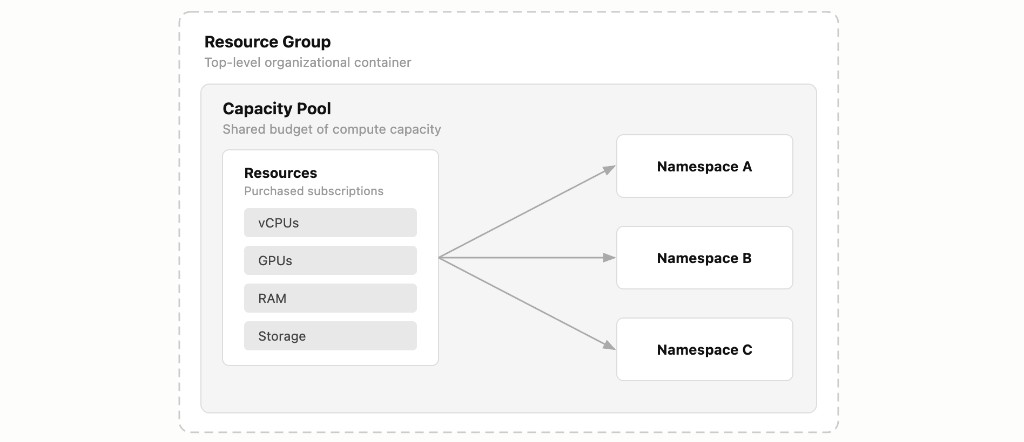
A Resource Group contains one or more Capacity Pools. Each Capacity Pool contains one or more Namespaces. Your compute, memory, storage, and GPU resources are purchased as individual subscriptions and assigned to a Capacity Pool, making them available to the Namespaces within it.
#
Resource Group
A Resource Group is a top-level organizational container that you create in the portal under the Resource Groups section. It is not a purchasable subscription, you simply create one by clicking Add Resource Group.
Resource Groups exist to help you organize your infrastructure logically. You might create one Resource Group per department, per project, or per environment (development vs. production). Everything else, Capacity Pools, Namespaces, and compute resources, lives inside a Resource Group.
#
Capacity Pool
A Capacity Pool is the dedicated budget of compute capacity that your workloads draw from. You add a Capacity Pool subscription (at no cost) to a Resource Group, and then assign paid resource subscriptions (CPU, RAM, Storage, GPU) to it.
Think of a Capacity Pool as a shared resource reservoir. All the Namespaces within a given pool draw from its total allocated resources. You can create multiple Capacity Pools within a single Resource Group to separate concerns, for example, one pool for general-purpose workloads and another for GPU-intensive AI workloads.
#
Namespace
A Namespace (called a Project in OpenShift) is an isolated partition within a Capacity Pool. You add a Namespace subscription (at no cost) to a Capacity Pool, and it becomes a governed slice of that pool's resources.
Each Namespace enforces its own resource quotas and access controls. This is where multi-tenancy happens: different teams, applications, or environments can share the same Capacity Pool while remaining isolated from each other through ResourceQuota limits and RBAC policies. For a deeper explanation of quotas and access control, see Namespaces, Quotas and RBAC.
#
Compute (CPU)
Compute is measured in vCPU cores, where 1 vCPU equals 1000 millicores in Kubernetes notation. CPU is purchased as a subscription and assigned to a Capacity Pool.
CPU is a compressible resource. If a pod tries to use more than its defined limit, Kubernetes throttles it rather than terminating it. This means CPU contention degrades performance but does not cause outages.
#
Memory (RAM)
Memory is measured in GB and purchased as a subscription assigned to a Capacity Pool.
Unlike CPU, memory is non-compressible. If a pod exceeds its memory limit, the Linux kernel terminates it with an OOMKill signal. This makes accurate memory sizing particularly important for production workloads -- underestimating memory requests leads to pod evictions, not just slower performance.
#
Storage
Storage is measured in GB and purchased as a subscription assigned to a Capacity Pool. Within a Namespace, storage is provisioned through PersistentVolumeClaims (PVCs) backed by a configured storage class.
Storage is a fixed allocation: once a PVC is created, it reserves its requested capacity. If the Namespace's storage quota is exhausted, new PVC creation is blocked until capacity is freed or the quota is increased.
#
GPU
GPU capacity is purchased as a subscription and assigned to a Capacity Pool. GPUs are allocated as whole units and are not shareable across Namespaces: unlike CPU, a GPU assigned to one workload cannot be partially consumed by another. GPUs are used for AI inference and other accelerated workloads. Our current GPU offerings are NVIDIA H100 (80GB) and H200 (141GB).
When provisioning a GPU in the Phoeniqs Portal, choose container GPU (default, for pods requesting nvidia.com/gpu) or VM passthrough (dedicated GPU for virtual machines). See GPU Infrastructure for scheduling, driver responsibility, and deployment details.
#
Hosted Cluster
A Hosted Cluster gives you a dedicated OpenShift Kubernetes cluster with its own control plane, running on Phoeniqs' Swiss sovereign infrastructure. Unlike workloads that run in Namespaces on shared clusters, a Hosted Cluster provides full administrative access to your own cluster while Phoeniqs manages the underlying control plane infrastructure.
Each Hosted Cluster includes a dedicated control plane (etcd, API server, and scheduler), worker nodes sized to your requirements, a stable cluster API hostname, and Ceph-backed storage classes for persistent volumes. Worker nodes, root volumes, etcd storage, and other IaaS resources are provisioned separately and assigned to the cluster's Capacity Pool.
For more information, read the Hosted Cluster page.
#
IPv4 Address
A public IPv4 address is purchased as a subscription and assigned to a Capacity Pool. It makes a workload reachable from the public internet, exposing services running in a Namespace beyond Phoeniqs' internal network. IPv4 addresses are allocated as whole units and are not shareable across Namespaces: an address assigned to one workload cannot simultaneously route traffic to another.
Public IPv4 is a scarce resource. Once assigned, an address is reserved for that workload until it is released back to the Capacity Pool, at which point it becomes available for reassignment.
#
How It All Fits Together
To summarize the relationships and what is purchasable:
For detailed pricing per resource unit, see the Resource Pricing reference.
#
Example Setup
The example below imagines one company with two departments each running their own workloads on Phoeniqs Cloud. Each department has its own Resource Group, but they choose different ways to split Capacity Pools and namespaces to fit how they work. Marketing AI maintains an application that generates marketing material. Innovation Team works across departments, coordinating prototypes and pilots that involve several parts of the business.
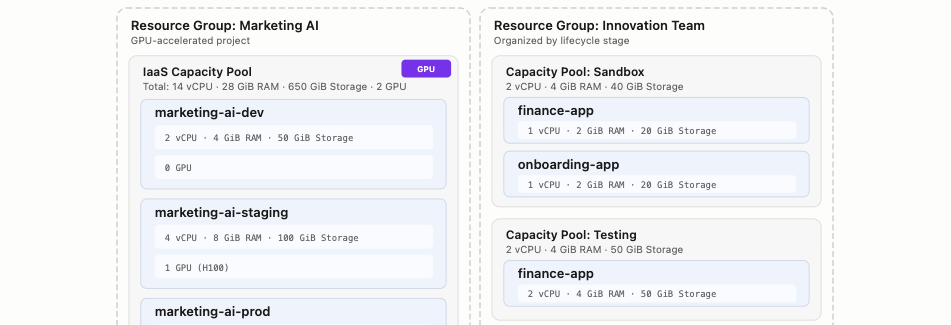
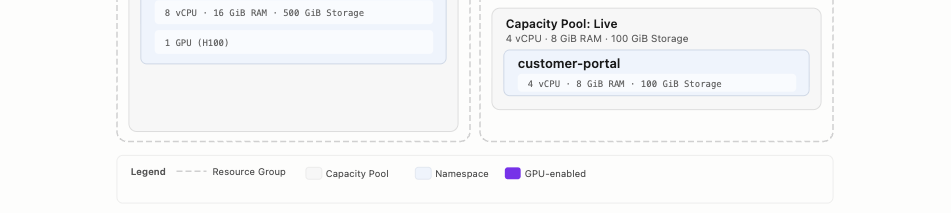
Marketing AI uses a single Capacity Pool with three Namespaces following a classic dev/staging/prod pipeline. GPU resources are allocated only where needed, staging gets one GPU for validating model inference before production, while dev runs without GPU to keep costs low.
Innovation Team takes a different approach. Instead of one pool per project, the team organizes by lifecycle stage, Sandbox, Testing, and Live, with each pool hosting whichever projects have reached that stage. The finance app is being prototyped in Sandbox and validated in Testing. The onboarding app is still in early experimentation. The customer portal is already serving users in Live.
There is no single correct way to structure Resource Groups and Capacity Pools. The platform is flexible enough to match however your teams and projects are organized.
#
Notes
tip Need help?
If you experience any issues or need assistance, please contact support.