
#
Networking
Phoeniqs infrastructure uses a layered network architecture spanning multiple data centers, designed for security, isolation, and flexibility.
#
Physical Network
The Physical Network is built on a Layer 2 topology spanning multiple data centers, separated by VLAN to ensure traffic isolation between tenants and services.
#
Virtual Networks in OpenStack
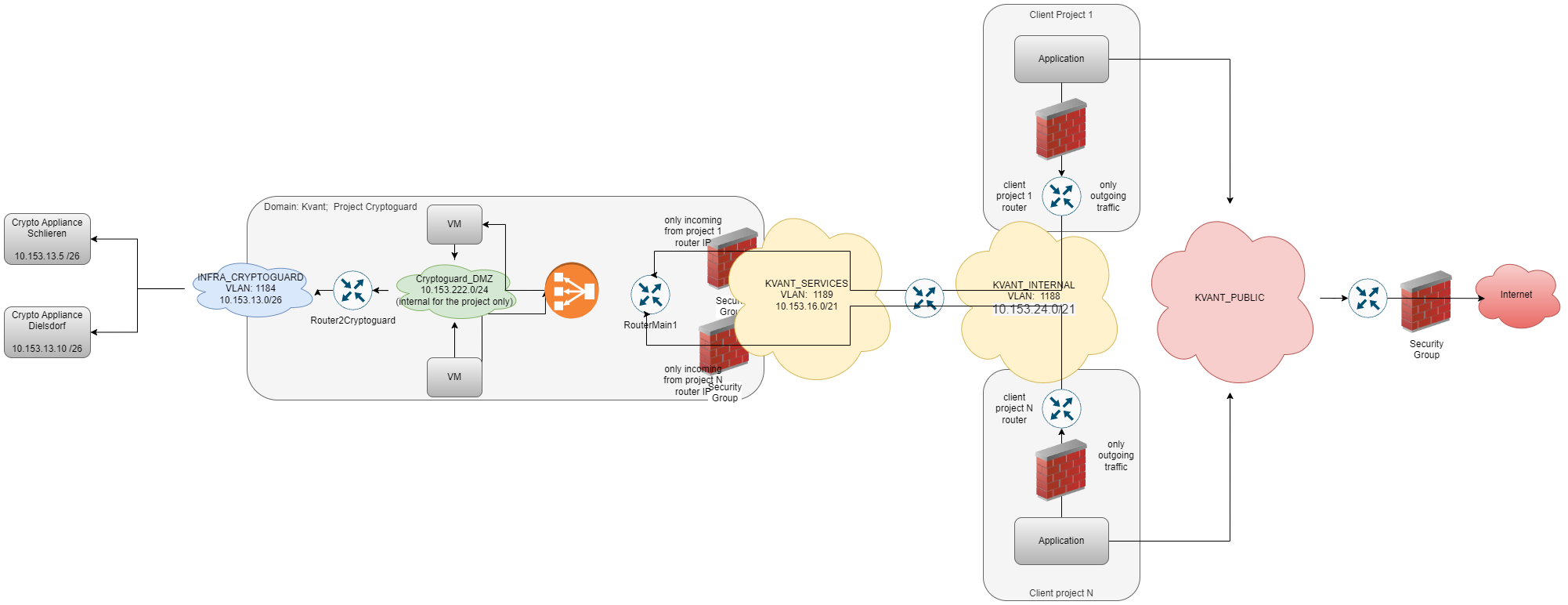
There are four types of virtual networks available. Each serves a distinct purpose and is colour-coded to match the architecture diagram below.
#
Shared Networks
Available across all projects:
PHOENIX-TECHNOLOGIES_PUBLIC
Connects directly to the internet. IPs are publicly reachable.
- Security groups must be configured to restrict ingress access.
- The default Security Group blocks all ingress.
- Egress should also be limited to prevent data leakage.
PHOENIX-TECHNOLOGIES_INTERNAL & PHOENIX-TECHNOLOGIES_SERVICES
Internal networks used to connect OpenStack projects when required.
Security groups must be used to limit ingress. Egress can also be restricted, for example to allow connections only to internal services.
#
Project-Private Networks
Scoped to individual projects:
Internal (DMZs)
The most commonly used network type. Recommended for keeping traffic local to the project, attach all VMs to these networks.
- You can use any IP range, as long as it does not conflict with other connected networks (Internet,
PHOENIX-TECHNOLOGIES_INTERNAL).
External (Infra and CoLocation)
Special networks for accessing infrastructure elements within Phoeniqs, for example, hardware devices such as LPARs not managed by OpenStack.
#
Network Diagram
#
Notes
tip Need help?
If you experience any issues or need assistance, please contact support.
#
See also