
#
Buy a Subscription
Phoeniqs subscriptions deliver secure, high-performance AI and cloud infrastructure, built for scalability, compliance, and Swiss data sovereignty.
#
Prerequisites
Before purchasing, make sure you have the following:
- An active Phoeniqs portal account
- A company profile associated with your account
- Administrative privileges to make purchases on behalf of your organization
- A valid payment method or corporate billing profile
Tips
- If you do not have an account yet, Create an Account first.
- You can create a company profile during checkout, but your account must be created first.
- Still struggling to associate a company to your account? See Company and User Management.
#
How to buy a Subscription
#
1. Sign in to the Phoeniqs portal
Sign in at https://console.phoeniqs.com with your admin account.
Tip
If you have trouble signing in, see the Log In to an Existing Account section on the Create an Account page.
#
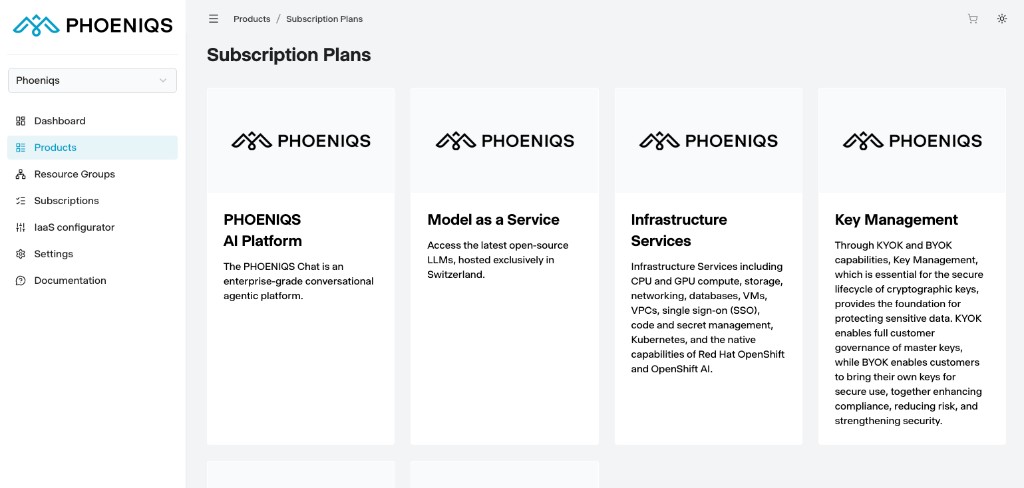
2. Browse products
From the Dashboard, click Add Subscription, or click Products in the left navigation. Select a subscription from the available categories.
#
3. Add to cart and complete checkout
- Click Add to cart on each subscription you want. You can add more than one product before checking out.
- Open the shopping cart from the upper-right corner and click Proceed to Checkout.
- On the Checkout Summary, confirm you have an account and a company associated. If needed, click Create Company and fill in the required fields. Accept the terms and conditions.
- Click Buy Subscription to complete your order.
Tips
- Click Products in the left nav at any time to return to the full product list.
- If you encounter issues creating a company, log out and log back in.
#
After Purchase
- Business Leaders: Monitor subscription status, billing, and usage in real time via the portal.
- Technical Teams: Launch products immediately, view active subscriptions, or return to the dashboard to start provisioning.
#
Troubleshooting
#
Notes
tip Need help?
If you experience any issues or need assistance, please contact support.
#
See also